Author Archives: Mr. M

Array Fun 2 [2025]

Complete all the methods below. When you are done, copy and paste the    testmethods.v5.1  into your class and run it to see if you have any obvious errors.  The above code does not guarantee you a 100 but will help catch most of the common errors that students make.

Note: You may not use any external libraries (like Java.Arrays etc )or import any code. Everything can be done with just loops and variables.

int sumEveryN(int[] nums, int n)

Description:This method returns the sum of every  n  elements of nums ..

Method Call return value/output
sumEveryN( {1 , 2 , 3 , 4 }, 2 ) 4( ie 1 +3)
sumEveryN( {13 , 42, 15, 33 , 44 , 16 , 52} ,3) 98 ( ie 13 + 33+ 52)

String[] doubleArr(String[] strs)

Description: This method returns a new version of strs  in which each element now appears twice. This can be done with a for-each loop, which I believe is easier and more intuitive.

Method Call return value/output
doubleArr( {“a”,”b”,”c”} ) {“a”,”a”,”b”,”b”, “c” , “c”}
doubleArr( {“math”,”ware”,”house”,”.com” }) {“math”,”math”,”ware”,”ware”,”house”,”house”,”.com”, “.com”}

int  indexOf5(int[] nums )

Description:This returns the index of the first occurrence element 5  or -1 if 5 does not appear anywhere in the array.

Method Call return value/output
indexOf5( { 2 , 3 , 5 , 4 } ) 2
indexOf5( { 2 , 3 , 5 , 4, 5  } ) 2
indexOf5( { 2 , 3 ,7  , 4, 3,   } ) -1

More Sample calls and return vals

screenshot.41


int indexOf(int[] nums, int num)

Description: This method returns the index value of the first appearance of num  or -1 if num  is not an element of nums  .

Method Call return value/output
indexOf( {6,4 ,7,3, 4 }, 4) 1
indexOf( {6,4 7 ,3,2,7}, 7) 2
indexOf( {6,4 ,2,3}, 22) -1


int[] randos(int start, int end, int howMany)

Description:  This method returns an array of random numbers between [start,end] . Note make sure that each element in the new array attempts to make a new random int.  Use Math.random() , do not use any other mechanism for finding a random number. 

 randos_loop
 More example calls and returns :
randos2

double meanBetween(int[] nums, int min, int max)

Description:  This method returns the mean of nums ; however, this method only counts values within the range (min,max) as shown in the examples below:

screenshot.12
(Not inclusive, so do not count min or max )

Old versions:

Array Fun 1 

Array F un 2 (v 1)


Array Fun 3 (resizing included)

Extrude with Offset

Step 1) Create a rectangle centered at the origin with a height of 20 and width of 30:

30by20rectangle

Step 2) add an arc as shown. Make sure it’s dimensioned :

30by20rectanglewarc

Step 3) Now the bottom:

30by20rectanglewarcNumba2


Step 4) Extrude the shape by 25MM:

extrude25mm

Step 5)  un-hide sketch 1

unhideSkettch1

Step 6)

Go into sketch 1 and create  2 MM offset on the top arc and on the bottom arc, then connect their endspoints with lines :

offset as 2

Step 7)

Final Result

final-result


Draw Ghost shape for halloween

Use the Spline tool to make a picture of a ghost

spline tool

This is worth 5 points. You can see examples of grades a


3 out of 5

3 out of 5

4 out of 5

4 out of 5

5 out of 5

5 out of 5


Or you can do a comparable one

Below is what some students have already done :


5 out of 5


5 out 5 B

bat shape- on shape

Step 1)  Use the Spline tool to create a bat shape. The more complex the shape, the more the points.

Picture 1 : 4/5

Screenshot from 2025-10-23 07-56-38


Picture 2 : 5 out o 5

bat pciture 2

You can also pick a more complicted or different picture


Do an extrude on it.


Coffe Cup Tips

How to Dimension over a Construction (mirror line)

mirror lined dimension\

After offset, make sure you’re points are coincident– Watch the end carefully!

offset and coincident 2


Curve Point option of plane

curve point option

Multi-Extrude and Revolve

Step 1) Open up any do-now that we have already done . Delete the prior sketch

Step 2) Create a rectangle with a center on the origin and a height of 40 and width of 50

center point rect icon

Step 3) Make a circle centered at the origin. The  4 points of the rectangle should be coincident with this circle. Resulting picture:

circle aroudn rect

Step 4) Use the scissors tool to create this :

scissors to create

Step 5)  Create a circumscribed polygon with 6 sides (hexagon). The 2 vertices should be coident with the points as shown below:

hexagon coincident


Step 6)  Use the scissor tool to make this :

scissors to create pat deux

Step 7) Extrude the middle part  by 50MM and the bottom remaining hexagonal part by 30 MM. to produce:

multi-extrude


Step 8)  take a screenshot and attach to google doc and then delete your work


Part II: Your own Revolve, Seep or Loft

Create at least 3 interconnected shapes (circle, arcs, rectangles etc..). Perform either a revolve, a loft or a sweep. I will give an extra credit point if yo udo a sweep or loft!

Revolves and Shapes with Symmetry

Do now

Step 1) Clear out an old do now. Create a center point circle with a radius of 20:

center-point-circle

Step 2)  Make a diameter

diameter

Step 3) Use the scissor tool to cut the bottom half of the circle off

diameter scissors

Step 4)  Make a  vertical construction line right up the middle of the circle

vertical construction line

step 5) Add 2 lines symmetric about the construction line

symmetric about construction line

Step 6) the angle should be 40 . How to dimension an angle

dimension central angle

result :

dimension final final

step 7) Use the scissors tool to cut out the center arc.

cut out middle


step 8) MIrror the shape over teh diameter:

cut out middle


Step 9) Extrude 1 half of shape by 45 MM

extrude

Step 10) Extrude the other half by 27 MM


Part II . Your own shape

After you take a screenshot of the above shape, do a different type of 3-d model. You can use anything else whether its a revolve, a sweep  or a loft

To get full credit on this you must use either a sweep or a loft as your 2nd 3-d shape.


2 Revolves and add a plane

We are going to make 2 revolves

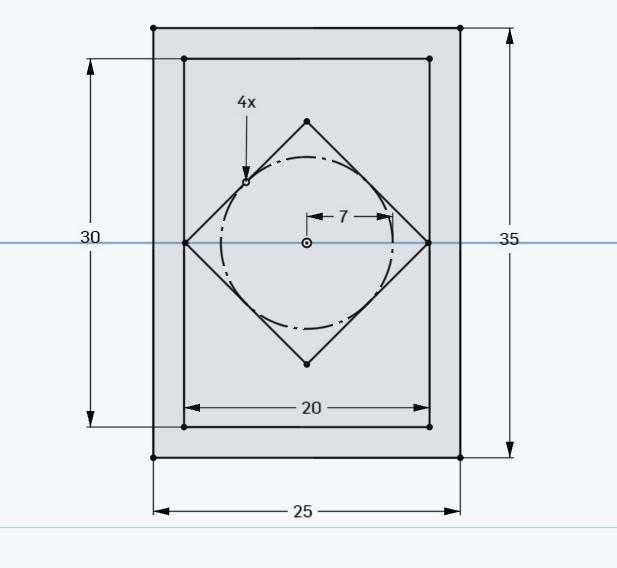
Step 1) create a 20×30 rectangle with centered at the origin. “Center point

20 by 30 at center

Step 2) Add a 3 point arc using tangent

tangent arc

Step 3) Create a fillet with a radius of 7

fillet with a radius of 7

Step 4)  Add a construction line , dimension it to 28 MM away from origin

construction line-dimensioned

Step 5) Revolve the shape around the construction line to produce:

revolve

Step 6)  Create a reference plane. Make sure you connect it to the top plane :

reference plane

Step 7)  Take a screenshot of the  above shape and paste it in google doc


Step 8) Create  an extrude of a complex shape.  Your “complex shape” should be at least 3 parts (like a circle a rectangle and something else). Your extrude should go to 2 different heights


Take a final screenshot into the google doc