Description: This method creates an array that is filled with all of the digits of
nums.
| Method Call | return value/output |
| digitsToArray( 523 ) | {5,2,3} |
| digitsToArray(1267 ) | { 1 , 2 , 6 , 7} |
Description: This method returns true if each element of
numsis a factor of the sum ofnums.
| Method Call | return value/output |
| allFactorsOfSum( {6,1,2,3} ) | true (because all of the elements are factors of the sum which is12) |
| allFactorsOfSum( {1,4,7 }) | false (because 7 is not a factor of the sum of this array which is 12) |
Description: This method returns a new version of
strswith each element appearing twice.
| Method Call | return value/output |
| doubleArr( {“a”,”b”,”c”} ) | {“a”,”a”,”b”,”b”, “c” , “c”} |
| doubleArr( {“math”,”ware”,”house”,”.com” }) | {“math”,”math”,”ware”,”ware”,”house”,”house”,”.com”, “.com”} |
Description: This method returns true if
numis an elementnums.
| Method Call | return value/output |
| isThere( {6,1,2,3}, 6) | true |
| isThere( {6,1,2,3}, 5 ) | false |
Description: This returns the index of the first occurrence element ‘5’ or -1 if 5 does not exist.
| Method Call | return value/output |
| indexOf5( { 2 , 3 , 5 , 4 } ) | 2 |
| indexOf5( { 2 , 3 , 5 , 4, 5 } ) | 2 |
| indexOf5( { 2 , 3 ,7 , 4, 3, } ) | -1 |
Description: This method returns the index value of the first appearance of
numor -1 ifnumis not an element ofnums.
| Method Call | return value/output |
| indexOf( {6,4 ,7,3, 4 }, 4) | 1 |
| indexOf( {6,4 7 ,3,2,7}, 7) | 2 |
| indexOf( {6,4 ,2,3}, 22) | -1 |
Description: This method returns the index value of the last appearance of
numor -1 ifnumis not an element ofnums.
| Method Call | return value/output |
| lastIndexOf( {6, 4 ,7 ,3, 11, ,4}, 4) | 5 |
| lastIndexOf( {7, 6,4 , 7 ,3}, 7) | 3 |
| lastIndexOf( {6,4 ,2,3}, 22) | -1 |
Description: This method returns true if each element in nums is greater than the element to its left.
| Method Call | return value/output |
| isIncreasing( {1,2,3,4 }) | true |
| isIncreasing( {1,0 ,3,4 }) | false |
| isIncreasing( {1,1, 2,3,4 }) | false |
| isIncreasing( {-1, –1, -2, -3, -4 }) | false |
Description: This method returns the largest span of consecutive increasing numbers
| Method Call | return value/output |
| largestSpan( {4, 3, 1, 3, 6 , 1} ) | 3 |
| largestSpan( {4 3 1 , 12 , 31 , 44 , 52 , 1} ) | 5 |
| largestSpan( {1 , 7 8 , 12,4, 3, 0, 4 , 1) | 3 |
Description: This method ‘inverts’ an array by spliting the array in halves and ‘inverting’ each half. See sample calls to understand.
| Method Call | return value/output |
| invert( {5 , 21, 5, 13,4 }) | {21 , 5 , 5, 4,13 } |
Description: This method returns the array with all digits shifted by
delta. Any digits that are circulated off the end of the array should be returned to the other side. Note: delta could be positive or negative. Please keep in mind that Math.abs(delta) > nums.length could be possible 😉
| Method Call | return value/output |
| shiftByN( {5 , 21, 13,4 } 1) | { 4 , 5 , 21, 13 } |
| shiftByN( {5 , 21, 13, 4 , 11} 2) | { 4 , 11 , 5 , 21, 13} |
| shiftByN( {5 , 21, 13, 4 } -1) | { 21, 13, 4 , 5} |
| shiftByN( {5 , 21, 13, 4 ,7 } -2) | { 13, 4 ,7 , 5 , 21} |
1 < base < 11num1.length = 5 and num2.length = 5Description: This method attempts to replicate addition. Consider both num1 and num2 represent the five digits of a number. Each element in the array stores one of the digits. For instance, the number 143 would be represented as {0,0,1,4,3 }. Numbers can be in any base between 2 and 10 inclusive , and the number 101102 in binary would appear in an arrays as : {1, 0, 1 , 1, 0 } . Let’s assume the numbers are positive.You should return an array representing the digits of the sum of num1 and num2. If the number of digits in the sum exceeds the maximum number of digits (5) , you should throw an arithmetic exception as shown in the code below:
if(overFlowAdditionOccurred)
 	throw new ArithmeticException("Addition Overflow Error");
Note: You may not use any kind of helper or utility methods that are built into pre-defined Java classes for converting numbers between bases. Only use techniques taught in this class.
| Method Call | return value/output |
| add( {0,0,0 ,4,2},{0,0,0,5,1}, 10) | {0, 0, 0, 9, 3} ie (42 + 51 = 93) |
| add( {0, 0, 0 ,7,2},{0,0,0,5,1}, 10) | {0, 0 , 1 , 2, 3} ie (72 + 51 = 123) |
| add( {0, 0 , 0 , 1 , 1}, { 0 , 0 , 0 , 1 }, 2) | {0, 0 , 1 , 0 , 0} ie ( 112 + 12= 1002 ) |
Array Fun 1
Create a Class called ArrayFun that has the following methods Write the body for the methods described below.
public int[] swapFirstLast(int[] nums)
Description: This method returns a new version of the array with the first and last elements of
numsswapped.
| Method Call | return value/output |
| swapFirstLast( {3, 2 ,5 } ) | {5,2,3} |
| swapFirstLast( {7, 6 ,9 ,12} ) | { 12 , 6 , 9, 7} |
public String[] swapFirstMiddle(String[] strs)
Description: This method returns a new version of the array with the first and middle elements of
strsswapped.
| Method Call | return value/output |
| swapFirstMiddle( {“a”,”b”,”c” } ) | { “b”, “a”, “c”} |
| swapFirstMiddle( { “zoo”,”foo”, “xoo”} ) | { “foo”,”zoo”, “xoo”} |
Loops
public void printEveryOther(int[] nums)
Description: This method prints every other element of
numson new lines .
| Method Call | return value/output |
| printEveryOther( {1 , 2 , 3 , 4 } ) | 1 3 |
| printEveryOther( {13 , 42 , 33 , 44 , 52} ) | 13 33 52 |
public int sum(int[] nums )
Description: This method returns the sum of
nums..
| Method Call | return value/output |
| sum( { 2 , 8 }) | 10 ie 2 + 8 |
| sum( { 2 , 8 , 4 } ) | 14 ie (2 + 8 + 4 ) |
public int sumOdds(int[] nums )
Description: This method returns the sum of all the odd element of
nums.
| Method Call | return value/output |
| sumOdds( { 5 , 2, 4 , 6 , 7 } ) | 12 ( ie 5 + 7 ) |
| sumOdds( { 13 , 3, 2, 6 , 7 } ) | 23 |
Description: This method returns the mean of
nums. Pay close attention to the second sample call and make sure you get “5.25“
| Method Call | return value/output |
| mean( { 2 , 8 }) | 5.0 ie (2+8)/2 |
| mean( { 2 , 8 , 4 , 7 } ) | 5.25 ie (2+8+4+7)/4 |
public double largest(double[] nums )
Description: This method returns the element of
numswith the greatest value. Make sure that you test out the second call and get ‘-2‘.
| Method Call | return value/output |
| largest( { 2.6 , 8.2, 5.2}) | 8.2 |
| largest( { -2,-11, -4} ) | -2 |
public int sumEveryN(int[] nums, int n)
Description: This method returns the sum of every
nelements ofnums..
| Method Call | return value/output |
| sumEveryN( {1 , 2 , 3 , 4 }, 2 ) | 4( ie 1 +3) |
| sumEveryN( {13 , 42, 15, 33 , 44 , 16 , 52} ,3) | 98 ( ie 13 + 33+ 52) |
*public int secondSmallest(int[] nums )
Description: This method returns the element of
numswith the second smallest value.
| Method Call | return value/output |
| secondSmallest( { 2 , 18 , 22, 4 , 6 } ) | 4 |
| secondSmallest( { 3 , 7 , 15 , 1 ,101} ) | 3 |
** boolean isPalindromic(int[] nums)
Description:This method returns true if the elements of
numsare a palindrome..
| Method Call | return value/output |
| isPalindromic(( { 5 , 2, 7 , 2 , 5} ) | true |
| isPalindromic( { 5 , 2, 7 , 3 , 5} )) | false |
| isPalindromic(( { 1 , 2, 1} ) | true |
1 < base < 11num1.length = 5 and num2.length = 5Description: This method attempts to replicate addition. Consider both num1 and num2 represent the five digits of a number. Each element in the array stores one of the digits. For instance, the number 143 would be represented as {0,0,1,4,3 }. Numbers can be in any base between 2 and 10 inclusive , and the number 101102 in binary would appear in an arrays as : {1, 0, 1 , 1, 0 } . Let’s assume the numbers are positive. You should return an array representing the digits of the sum of num1 and num2. You may not do any math besides addition. You may not use any external libraries for any math or base conversions. If the number of digits in the sum exceeds the maximum number of digits (5) , you should throw an arithmetic exception as shown in the code below:
if(overFlowAdditionOccurred)
 	throw new ArithmeticException("Addition Overflow Error");
Note: You may not use any kind of helper or utility methods that are built into pre-defined Java classes for converting numbers between bases. Only use techniques taught in this class. What you have to do is reproduce the additional algorithm and find a way to carry digits , programmatically.
| Method Call | return value/output |
| add( {0,0,0 ,4,2},{0,0,0,5,1}, 10) | {0, 0, 0, 9, 3} ie (42 + 51 = 93) |
| add( {0, 0, 0 ,7,2},{0,0,0,5,1}, 10) | {0, 0 , 1 , 2, 3} ie (72 + 51 = 123) |
| add( {0, 0 , 0 , 1 , 1}, { 0 , 0 , 0 , 1 }, 2) | {0, 0 , 1 , 0 , 0} ie ( 112 + 12= 1002 ) |
public int countF(String str)
Description: This method returns the number of times that the letter ‘f’ occurs in str.
| Method Call | return value/output |
| countF(“abcdef”) | 1 |
| countF(“abcdfef”) | 2 |
| countF(“fff”) | 3 |
| countF(“xxx”) | 0 |
public boolean has2Fs(String str)
Description: This method returns true if str has exactly two occurrences of the letter ‘f’ in it.
| Method Call | return value/output |
| has2Fs(“foo”) | false |
| has2Fs(“fofo”) | true |
| has2Fs(“foffo”) | false |
public boolean has2Fs3Gs(String str)
Description: This method returns true if str has exactly two occurrences of the letter ‘f’ in it and 3 occurences ‘g’.
| Method Call | return value/output |
| has2Fs3Gs(“foog”) | false |
| has2Fs3Gs(“foggfog”) | true |
| has2Fs3Gs(“foffoggg”) | false |
public int momOrDad(String str)
Description: This method returns the number of times that the String “mom” or the string “dad” occurs in the parameter str .
| Method Call | return value/output |
| momOrDad(“foog”) | 0 |
| momOrDad(“momf”) | 1 |
| momOrDad(“momdadmo”) | 2 |
| momOrDad(“momdadmom”) | 3 |
public String threeTimes(String str)
Description: This method returns the String str concatenated with itself three times
| Method Call | return value/output |
| threeTimes(“foog”) | “foogfoogfoog” |
| threeTimes(“abc”) | “abcabcabc” |
| threeTimes(“zt”) | “ztztzt” |
| threeTimes(“”) | “” |
public String nTimes(String str, int n)
Description: This method returns the String str concatenated with itself n times
| Method Call | return value/output |
| nTimes(“fg” , 2 ) | “fgfg” |
| nTimes(“abc” , 0 ) | “” |
| nTimes(“zt” , 3 ) | “ztztzt” |
| nTimes(“uiz” , 4 ) | “uizuizuizuiz” |
public String countMiddleChar(String str)
Precondition: str.length() ≥ 3.
Description: This method returns the number of times the middle letter of str appears in str.
| Method Call | return value/output |
| countMiddleChar(“acbcb” ) | 2 |
| countMiddleChar(“acbcx” ) | 1 |
| countMiddleChar(“bbbbb” ) | 5 |
| countMiddleChar(“xytbtzy”) | 1 |
public int indexOf(String haystack, String needle)
Description: Write your own indexOf() method. Obviously, you cannot make use of the String’s build in indexOf() method. This method returns the index of the first occurrence of needle in haystack . (Full credit if you can get this to work with Strings whose length is greater than 1).
| Method Call | return value/output |
| indexOf(“acxb”, “x” ) | 2 |
| indexOf(“zazt”, “z” ) | 0 |
| indexOf(“tayv”, “g” ) | -1 |
| indexOf(“hijklj”, “j” ) | 2 |
If you want the extra credit, then it must also be able to complete the following example calls
| Method Call | return value/output |
| indexOf(“acxb”, “cx” ) | 1 |
| indexOf(“acxb”, “cxb” ) | 1 |
| indexOf(“acxb”, “cxbt” ) | -1 |
public int countChars(String str, String chars)
Precondition:The length of chars is less than or equal to the length of str
Description: This method returns the number of times that charsoccurs in String str.
| Method Call | return value/output |
| countChars(“momdadmom” , “dad” ) | 1 |
| countChars(“foobofoo” , “foo”) | 2 |
| countChars(“foobofoofoo” , “foo”) | 3 |
| countChars(“foobofoofoo” , “xy” ) | 0 |
public void printTwos(String str)
Description: This method prints two letters from the String starting at with the first two letters and ending with the last two.
| Method Call | return value/output |
| printTwos(“abcdef”) | “ab” “bc” “de” “ef” |
Description: This method print every letter in reverse and on a new line.
| Method Call | return value/output |
| printReverse(“abcd”) | “d” “c” “b” “a” |
| printReverse(“thefoo”) | “o” “o” “f” “e” “h” “t” |
Description: This method print every 2 letter in reverse and on a new line.
| Method Call | return value/output |
| printTwoReverse(“abcd”) | “dc” “cb” “ba” |
| printTwoReverse(“thefoo”) | “oo” “of” “fe” “eh” “ht” |
public void printTwoReverseAgain(String str)
Description: This method print every 2 letter in reverse and on a new line and with no overlap of letters
| Method Call | return value/output |
| printTwoReverseAgain(“abcd”) | “dc” “ba” |
| printTwoReverseAgain(“thefoo”) | “oo” “fe” “ht” |

A SlowBug is a Bug that poops Rocks instead of Flowers when it moves. However, since Rocks take a little bit longer to get out than Flowers do, a SlowBug takes THREE timesteps (three calls to act) before it is able to move like a normal bug .
A SlowBug is a Bug has the following behaviors and attributes:
counter that is increased each time it acts
public SlowBug(java.awt.Color col)
counter variable.If you want, you can download SlowBug.gif and drag it into Eclipse or Bluej to use that image instead of the default Bug image.
The final result of running SlowBug would be something like the picture below.


A FastBug is a Bug and should contain the following behaviors:
darker()method five successive times on your color before passing it in to the Flower constructor.If you want, you can download FastBug.gif and drag it into Eclipse to use that image instead of the default Bug image.

If you want an A, you must do FIsh:

Last year’s Marine Biology Case Study was similar to GridWorld, but it worked with Fish objects that have a 1/7 chance of breeding (or, more accurately, spontaneously generating children) each timestep and a 1/5 chance of dying each timestep. A Fish cannot move backwards, and our Fish will not turn, move, or generate children diagonally; it will only use the 4 cardinal directions North, South, East, and West. For this part of the lab, we are going to create a similar Fish in GridWorld.
A Fish is an Actor and should contain the following behaviors and attributes:
private static int nextAvailableID = 1; private int myID;probabilityOfBreeding that is initialized to 1.0/7.0 and a private double instance variable for probabilityOfDying that is initialized to 1.0/5.0(Math.random()*256)typecast as an int to get random numbers between 0 and 255 for the Color constructor.
myID=nextAvailableID++;public String toString() method as follows:
public String toString()

{
return myID + " facing " + getDirection();
}protected boolean breed() method should be written that:
Math.random() and checks to see if the number is the random number generated is >= probabilityOfBreeding. If it is, return false (your Fish did not breed this time).< probabilityOfBreeding, that means we will try to breed in all the empty locations in front, behind, to the left, and to the right of us.true (you successfully bred).protected void move() method should be written that:
public void act()

{
// Try to breed.
if ( ! breed() )

move();
if ( Math.random() < probabilityOfDying )

removeSelfFromGrid();

}
If you want, you can download Fish.gif and drag it into Eclipse to use that image instead of the default Actor image.
It can be kind of hard to tell what is happening, but if you move your mouse over a Fish in the grid you can see the toString() printed out, which will tell you which unique fish id you are looking at. Since breeding, dying, and moving are random, there is no set way to guarantee what your grid will look like, but here is how mine looked after it ran a few times

Assignment if_elif_else_while_D
Use this code at the start of your program
tim = Jeroo()
while not ( tim. isWater(AHEAD) and  tim.hasFlower() ) :
   if tim.isFlower(AHEAD) :
      tim.hop()
      tim.pick()
   elif not tim.isClear(AHEAD) :
      tim.turn(RIGHT)
      tim.hop()
      tim.turn(LEFT)
      tim.hop(2)
      tim.turn(LEFT)
      tim.hop()
      tim.turn(RIGHT)
   else :
       tim.hop()
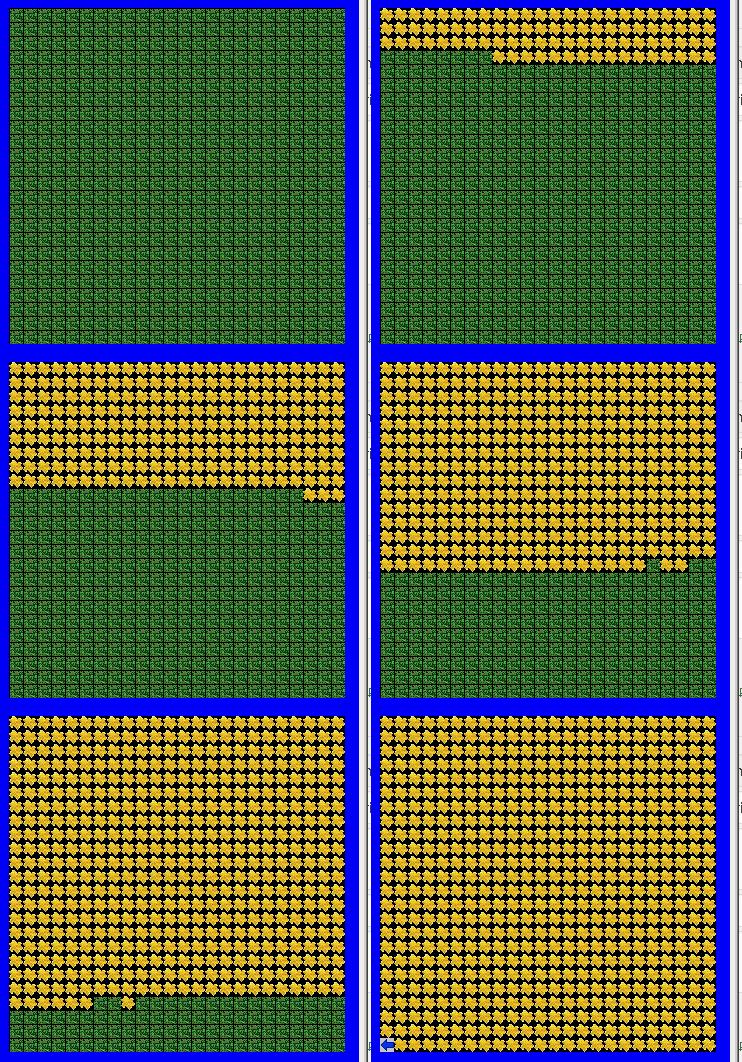
The map

What the map and Jeroo looks like at the completion of the loop


Parameters
Map #1
Grade : 2/10
Grade : 3/10
D:\My Drive\2021-22_gdrive\intro 2021-22\jeroo\maps-student\unit-5


Grade : 8/10
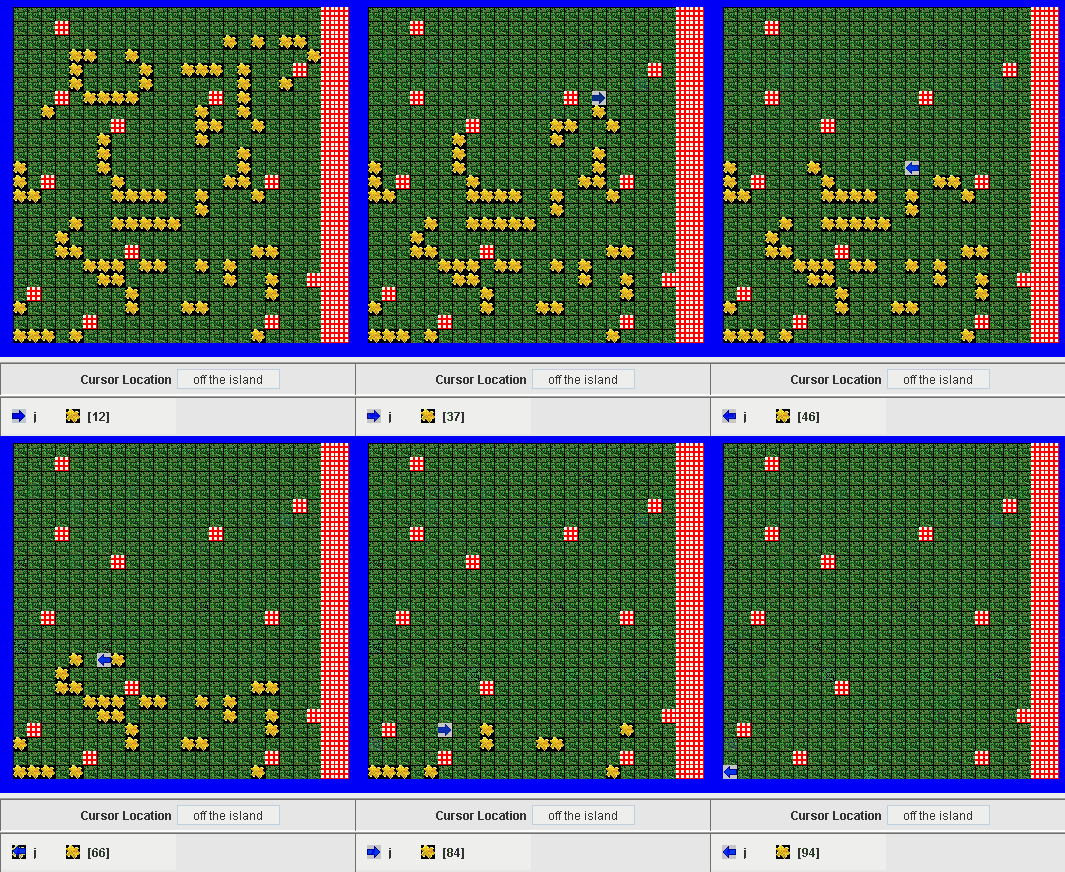
Note: Do not be fooled by how similar the next map is. You will probably have to rewrite some code to complete the next one.


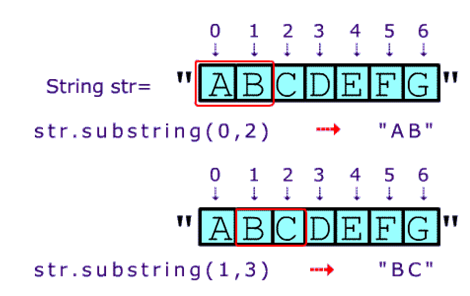
These exercises are introductory methods that require use of basic String methods including
- substring()
- length()
- “abc”.length() – >3
- concatenation
public boolean sameStrings(String string1 ,String string2)
Description: This method returns true if string1 and string2 are the same. Use the ‘.equals()’ method.
| Method Call | return value/output |
| sameStrings(“foo”,”f”) | false |
| sameStrings(“foo”,”foo”) | true |
| sameStrings(“abc”, “cba”) | false |
public boolean any2Same(String a,String b, String c)
Description: This method returns true if any 2 of the strings are the same. Remember: Use the ‘.equals()’ method.
| Method Call | return value/output |
| any2Same(“xz”,”f”, “xz”) | true |
| any2Same(“xz”,”f”, “xt”) | false |
| any2Same(“xz”,”xz”, “fff”) | true |
| any2Same(“xtz”,”abc”, “abc”) | true |
| any2Same(“xtz”,”a^c”, “a!c”) | false |
public String firstThirdLettters(String str)
Description: This method returns the first and third letters of str concatenated together.
| Method Call | return value/output |
| firstThirdLettters(“foo“) | “fo” |
| firstThirdLettters(“abcdefg”) | “ac” |
| firstThirdLettters(“ad!kjkj”) | “a!” |
public boolean sameFirst2Letters(String a, String b)
Description: This method returns the first 2 letters of a and of b are the same .
| Method Call | return value/output |
| sameFirst2Letters(“axt”, “axjjj”) | true |
| sameFirst2Letters(“1%3″ , “3$1″) | false |
| sameFirst2Letters(“a~dd” ,”~adt” ) | false |
public String concatTwice(String str)
Description: This method returns str concatenated with itself .
| Method Call | return value/output |
| concatTwice(“foo”) | “foofoo” |
| concatTwice(“a”) | “aa” |
| concatTwice(“abcdd”) | “abcddabcdd” |
public String concatWithComma(String str)
Description: This method returns str concatenated with itself and with a comma in between
| Method Call | return value/output |
| concatWithComma(“foo”) | “foo,foo” |
| concatWithComma(“a”) | “a,a” |
| concatWithComma(“abcdd”) | “abcdd,abcdd” |
public String sandwich(String bread, String meat)
Description: This method is easiest to understand by looking at the sample calls below
| Method Call | return value/output |
| sandwich(“a“,”b“) | “aba“ |
| sandwich(“xy“,”ab“) | “xyabxy“ |
| sandwich(“hi“,”bye“) | “hibyehi“ |
public int lengthTimesTwo(String str)
Description: This method returns the length of str times 2.
| Method Call | return value/output |
| lengthTimesTwo(“foo”) | 6 |
| lengthTimesTwo(“a”) | 2 |
| lengthTimesTwo(“abcdd”) | 10 |
String prePendFoo(String str)
Description: prepend “foo ” to the input and return the concatenation.
| Method Call | return value/output |
| prePendFoo(“abc”) | “foo abc” |
| prePendFoo(“x”) | “foo x” |
| prePendFoo(“abcdd”) | foo abcdd” |
public int sumOfLengths(String a, String a)
Description: This method returns the sum of the lengths of String a and String b .
| Method Call | return value/output |
| sumOfLengths(“ab”, “jk1”) | 5 ie ( 2 +3) |
| sumOfLengths(“jj”, “”) | 2 (ie 2 + 0) |
| sumOfLengths(“a~dd” ,”6″ ) | 5 ie ( 4 + 1) |
**public String concat5Times(String str)
Description: This method returns str concatenated with itself 5 times (Do this with a loop)
| Method Call | return value/output |
| concat5Times(“foo”) | “foofoofoofoofoo” |
| concat5Times(“a”) | “aaaaa” |
| concat5Times(“abcdd”) | “abcddabcddabcddabcdd” |